Somewhere in every “should we switch schedulers” conversation, someone pulls up a feature comparison chart. Pricing tiers get lined up side by side. Nobody in that meeting is pricing out what it actually costs to leave the tool the team is using right now. That gap is where migrations quietly blow past their timeline, their budget, or both.
This isn’t a knock on comparison shopping. Checking whether a new platform actually does what the old one couldn’t is the right first step. It’s what happens after the decision gets made that tends to get skipped. Here’s the cost stack that shows up once the contract is signed, and a way to estimate it before you’re the one explaining the overrun to your team.
Why “best tools” lists never mention what it costs to leave
Every “best social media scheduling tools” roundup follows roughly the same shape: features, pricing tiers, a comparison table, a verdict. That’s useful for picking a platform. It says almost nothing about what happens to the team currently running its calendar through a different one.
That’s a real gap, not a nitpick. Total cost of ownership is supposed to include the cost of getting out, not just the cost of getting in. A subscription that’s $40 cheaper a month can still be the more expensive choice once someone accounts for the weeks of double-running, retraining, and rebuilt integrations that come with switching to it. None of the comparison content treats that as part of the price, and the businesses making the switch usually feel it after the fact. Capterra’s 2025 Tech Trends Report found that 58% of U.S. businesses regret at least one software purchase made in the past year and a half, and 34% specifically point to onboarding and training difficulty as part of why.
The five-layer switching-cost stack
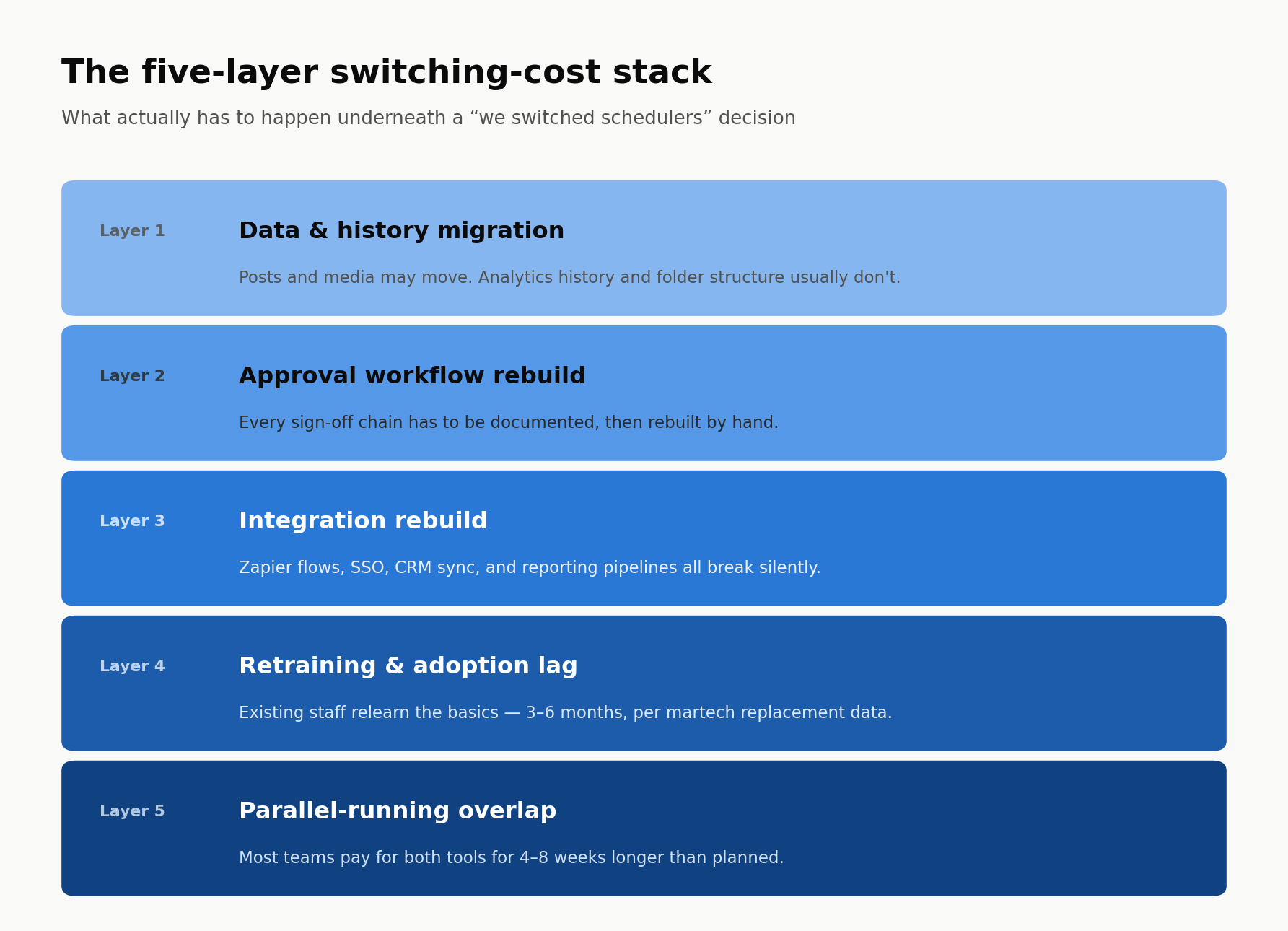
Migrating a scheduler isn’t one task. It’s five smaller ones, stacked on top of each other, and most teams only budget time and attention for the first.
Data & history migration
Some things move cleanly: draft posts, upcoming scheduled content, sometimes the media library if the new platform has a decent importer. What doesn’t move as cleanly is the history: past performance data, old captions people search back through for reference, the tags and folders someone spent a year organizing. A team migrating mid-quarter often discovers, too late, that eighteen months of engagement history simply doesn’t exist in the new tool, because nobody flagged an export before the old account got downgraded.
The fix is boring, and almost nobody does it: export everything before touching the new platform’s onboarding flow, not after.
This isn’t unique to social tools, either. Ask anyone who’s moved inventory tracking off a spreadsheet and into a dedicated platform like Sortly, and the same problem shows up. Historical counts and location data don’t travel automatically, and somebody has to decide, item by item, what’s worth re-entering and what gets left behind.
Approval workflow rebuild
Every approval chain (who signs off, in what order, with what exceptions for which brand) lives inside the old tool’s permission settings, and none of it transfers. It has to be rebuilt by hand, which means someone first has to write down what the actual process was, since most teams never documented it in the first place. An agency running four client accounts might have four slightly different approval chains that everyone just “knows,” and reconstructing all four correctly, in the new tool, is its own small project. That documentation step alone can take longer than the technical setup that follows it.
Integration rebuild
Zapier flows, single sign-on, the CRM sync, the business phone system that logs client calls, the analytics pipeline feeding the monthly report: these are the connections nobody thinks about until a report shows up empty. HubSpot’s 2026 social media marketing report found that while 93% of marketers expect their tech stack to stay the same size or grow, only 36% describe it as fully cohesive or integrated across workflows right now. Most teams are already living with fragile connections between tools. A migration doesn’t fix that. It just adds one more point where something can quietly break.
Retraining & adoption lag
Industry data on this backs up what it feels like from the inside. The 2024 MarTech Replacement Survey found that swapping a marketing tool typically takes three to six months from decision to full transition, and that it’s almost always existing staff who get retrained rather than a new team brought in to run the new platform. That’s months of a team operating at partial speed, looking up things they used to do without thinking.
A few operations leads get ahead of that lag in a simple way: they record the first live walkthrough of the new platform instead of relying on whoever ran the training to remember it correctly later. A meeting-notetaker tool like Fathom works fine for this. It means the institutional knowledge doesn’t live only in one person’s head.
Parallel-running overlap
Almost nobody flips a switch and turns the old tool off the same day. Most teams run both for a stretch, paying for two subscriptions, to make sure nothing gets missed during the handoff. That overlap tends to run four to eight weeks longer than planned, mostly because “we’ll cut over next week” keeps getting pushed by whatever this week’s actual publishing deadline happens to be. Two subscriptions for two months is a real line item, and it rarely shows up in the budget anyone approved when the switch was pitched.
A worksheet for pricing your own switch before you commit
Before signing anything, score your own situation across the five layers above instead of just the sticker price.
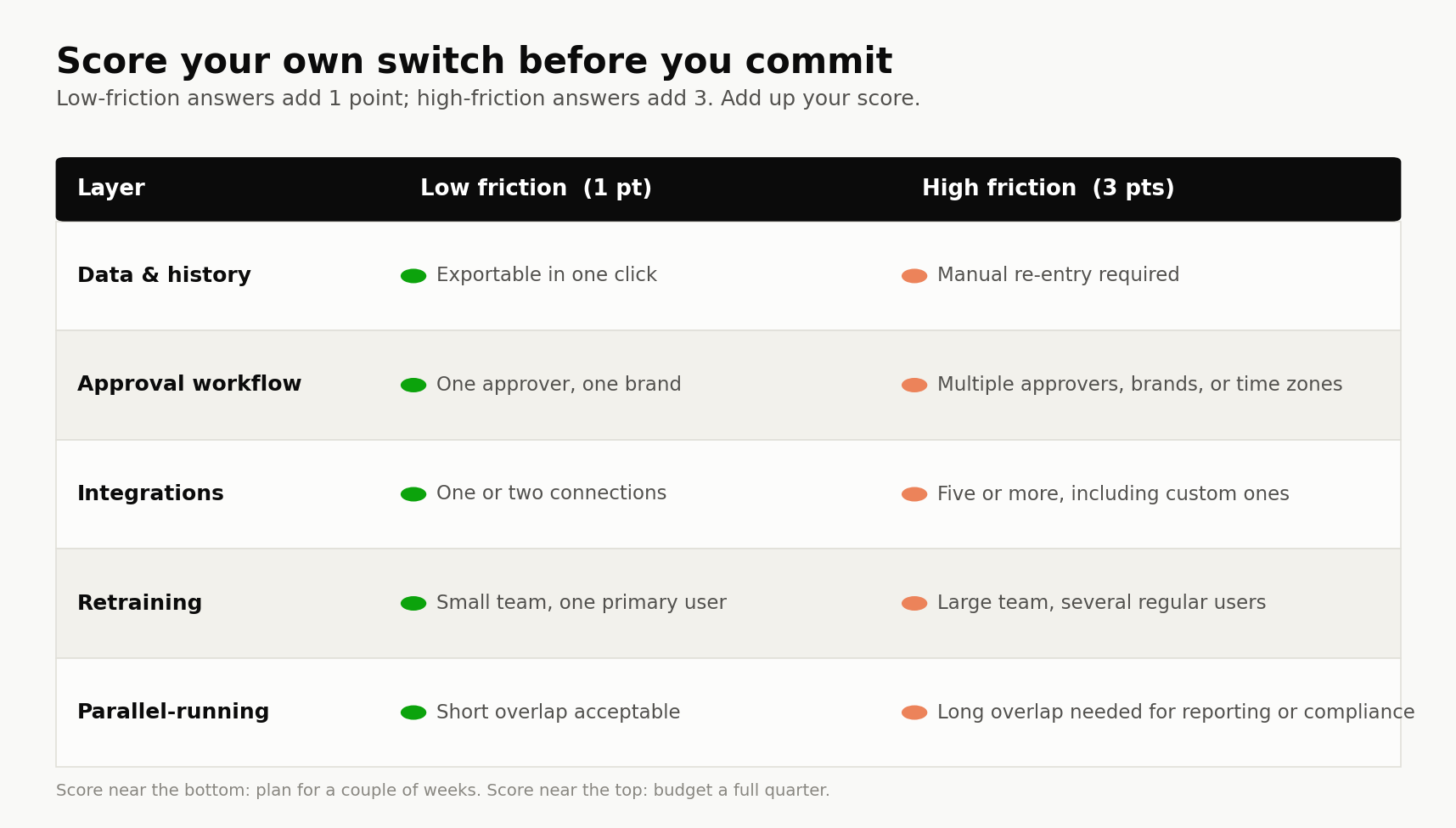
A team that lands on the low-friction side across most of these can probably switch in a couple of weeks. A team landing on the high-friction side should budget closer to a full quarter, and say so out loud before the migration starts rather than discovering it midway through.
Picture a ten-person agency running three client brands through one scheduler, with four approvers spread across two time zones and a handful of Zapier flows feeding client reports. That’s high friction on almost every layer above. Nobody on that team should expect a two-week switch, and telling the clients a full quarter up front is a very different conversation than explaining, six weeks in, why the reports have gone quiet.
What a lower-friction switch actually looks like
The stack above isn’t fixed. Some of it is a property of how portable a platform actually is, not just how complicated a team’s setup happens to be. A scheduler with a genuine data export, a documented API, and a migration team willing to get on a call and map the old permission structure into the new one shrinks three of the five layers before anyone touches a single setting.
That’s worth asking about directly during the sales process, not assumed. “Can I export everything, including analytics history, in a format I can actually reuse elsewhere?” is a fair question to ask before signing. A vendor’s answer, or the absence of one, tells you more about the real cost of switching than any feature comparison will. The same goes for approvals: ask whether the new platform can import a permission structure, or whether someone on their side will sit down and map it with you, rather than handing you a blank settings page and a help article.
FAQ
How long does it typically take to migrate to a new social media scheduler?
For a small team with one brand and a handful of integrations, a couple of weeks is realistic. For a team running multiple brands, several approvers, or custom integrations, budget closer to two to three months, in line with the three-to-six-month range marketers report for broader martech replacements.
What data should you export before switching tools?
At minimum: scheduled and drafted posts, the media library, historical performance data by post and by campaign, and any tagging or folder structure worth keeping. Export before starting the new platform’s onboarding, not after, since some of this data becomes harder or impossible to pull once an account is downgraded or closed.
Is it worth switching mid-quarter, or should you wait for a clean break?
It depends on how high your score came out on the worksheet above. A low-friction switch rarely needs to wait for a calendar boundary. A high-friction one, with multiple approvers or heavy reporting dependencies, is easier to justify at a quarter or campaign break, when there’s less live work caught in the transition.
Most of this cost is invisible right up until someone has to pay it. Pricing it in ahead of time doesn’t make switching schedulers free. It just means the team deciding to do it is the same one that has to live with what it actually takes.