A cafe owner hands a freelance manager their login to the cafe’s personal Instagram account. The owner asks the freelancer whether the account should become a Business account or a Creator account. Instagram’s Help Center answers that part of the question.
This article is a reading of three Instagram Help Center articles, read on 2026-10-19. No live accounts were switched to test the paths, and no third-party guides were used.
Instagram’s three pages explain two professional account types, Business and Creator, and describe the difference by audience. The pages provide one feature list for both Business and Creator, and no feature-by-feature split. It’s possible to switch a personal account to a professional account. A switch from personal to professional can be reversed, but it makes the account public and changes how posts are shared to Facebook.
What each account type is, in Instagram’s words
Instagram’s Help Center articles define professional accounts as Business or Creator. Personal accounts are described only by contrast.
| Type | What the help page says | Gap to state |
|---|---|---|
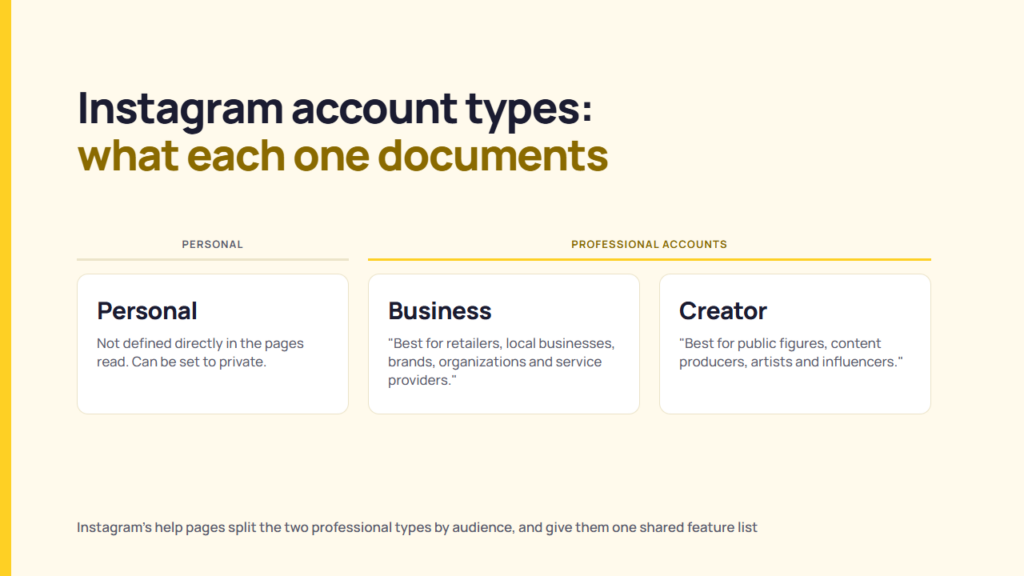
| Business | Instagram’s “About professional accounts” article says “Business accounts are best for retailers, local businesses, brands, organizations and service providers.” | No eligibility rule is stated; “Best for” is a description, not a requirement |
| Creator | Instagram’s “About professional accounts” article says “Creator accounts are best for public figures, content producers, artists and influencers.” | The same applies. Instagram’s separate Creator account article, opened by its own address on 2026-10-19, showed the professional accounts article |
| Personal | The articles read do not define a personal account. It is described by contrast: a professional account “can’t be set to private”, and the set-up article says that switching a private personal account “will make it public”. | No direct definition of a personal account in the pages read |
Sources: Instagram Help Center articles 138925576505882 and 502981923235522. Read 2026-10-19. Full list under Sources.
The cafe owner’s account sits in the cafe’s own terms: Instagram lists local businesses among the Business audience. That is a reading from the documentation, not a statement from Instagram. Instagram’s article pages do not say which type a particular account needs to choose.
What a professional account adds
Instagram’s article lists nine features. These are given to professional accounts as a group. However, the features are not given to Business or Creator accounts separately.
| Feature | What the article says |
|---|---|
| Professional dashboard | Tracks performance, gives access to professional tools and shows educational information curated by Instagram |
| Monetization and ads | A professional account can run ads and use Meta tools to create ads that appear on both Instagram and Facebook |
| Contact information | A Contact button near the top of the profile, with directions, a phone number and an email address. Anyone who taps Contact can see the information |
| Category label | A category below the profile image, the same as the category of the linked Facebook Page. It can be shown or hidden after set-up |
| Insights | Provides information on who followers are and when they are online, along with individual post results |
| Secondary inbox | An inbox with Primary, General and Requests folders |
| Ranked requests | Requests are sorted by received date or by top accounts |
| Manage followers | Review of potential spam follower requests, removal of suspected spam and bot accounts from followers |
| Improved discovery | Posts and reels may appear in search engine results, and a setting turns this off |
Source: Instagram Help Center, “About professional accounts on Instagram”. Read 2026-10-19.
A client who needs ads, Insights, or a Contact button gets all three in this list. The article does not say whether any of the nine features need a linked Facebook Page. Only the set-up article mentions Page connection. However, it calls the step optional.
What a professional account removes
Instagram’s article names two limits: a professional account cannot be private, and Facebook sharing runs only through the linked Page.
The article says “Professional accounts can’t be set to private.” Also, the article adds that “All pending follow requests will be automatically accepted when you go public.” If a Facebook Page is linked, the account is allowed to share Instagram posts to Facebook only through that Page. The article also says, “You won’t be able to share to another Facebook page or to a Facebook profile.”
Consider a client who maintains a private account for close customers. The client asks a freelance manager to switch the private account to Business. Instagram’s pages say the switch turns the account into public. This is suitable for clients who need a public brand presence. It does not suit clients who need the account to remain private. The pages read document no workaround.
Business vs. Creator accounts: what the pages say and do not say
The pages read separate Business and Creator accounts by audience, not by feature.
Instagram’s set-up article says the category chosen at the set-up time “does not determine whether you’ll set up a business or creator account”.
The set-up article gives separate steps for each: choose Creator for a creator account, or Business for a business account. The article adds that a creator account’s set-up has optional steps for the profile. The features article lists nine features under professional accounts as a group.
Because one feature list is given for both types, the pages read do not support naming a feature as Business-only or Creator-only, as per reasoning from the documentation. Therefore, the piece does not mention which account type has which particular feature.
Instagram says a professional account type can be switched at any time. So, the choice is not fixed. The client decides which account type they need to hold.
Switching, and switching back
Instagram’s pages document three moves to switch from one account type to another: personal to professional, Business to Creator or back, and professional to personal.
| Direction | Documented path | What the page says changes |
|---|---|---|
| Personal to professional | App: Profile, More, Settings and activity, then below “For professionals” tap Account type and tools, then Switch to professional account. Choose a category, then Creator or Business Web: More, Settings, “For professionals”, Account type and tools, Switch to professional account |
A private account becomes public and pending follow requests are accepted. Connecting a Facebook Page is optional and “will make it easier to share Instagram posts on Facebook and use connected experiences such as ads and shopping tools.” |
| Between Business and Creator | App: Account type and tools, Account type, Switch account type, choose the type, Switch Web: Creator tools and controls (creator accounts) or Business tools and controls (business accounts), then Switch account type |
The set-up article says the switch can be made at any time. No feature changes are listed. |
| Professional to personal | App: Account type and tools, Account type, Switch account type, Switch to personal account, then confirm | The set-up article says “you’ll no longer have access to ads and may lose access to select tools” and that a connected Facebook Page is disconnected. The switch-back article says access to Meta Business Suite and Meta Ads Manager is lost, while a public account still has the dashboard and insights. |
Sources: Instagram Help Center articles 502981923235522 and 1717693135113805. Read 2026-10-19.
Checking a client’s account before you make a switch
Six questions help sort an account before any switch.
| Question | What the documentation says to look for |
|---|---|
| 1. Which type is the account now? | Check the Settings and activity, then Account type and tools, to see whether the account is professional. |
| 2. Does the client need the account to stay private? | Instagram says a professional account can’t be set to private. |
| 3. Is a Facebook Page linked, and which one? | Instagram says posts share to Facebook only through the linked Page. |
| 4. Does the category label show, and does it match the Page? | Instagram says the label is the same as the linked Page’s category and can be hidden. |
| 5. Does the client agree to a switch, and who holds the login? | The pages read do not address this at all. The question is a matter between you and the client. |
| 6. Does the client know what a switch back removes? | Instagram says ads access is lost, a linked Page is disconnected, and Meta Business Suite and Meta Ads Manager access is lost when a professional account switches back to personal. |
Instagram documents the switch as reversible along with the losses in the table. Whether a given account should switch is a decision for the client. Enforcement against business accounts is a separate topic, covered in Business account restrictions: what the platforms actually document.
What could not be confirmed
This reading cannot settle eight points:
- The articles read provide no feature-by-feature differences or split between Business and Creator
- Instagram’s separate Creator account article showed the professional accounts article when opened
- The article on connecting or disconnecting a Facebook Page did not display its text on 2026-10-19 and was not used
- The articles don’t show any revision dates
- A personal account is not defined directly in the pages read
- Monetisation eligibility and Meta Verified were not read
- Menu labels differ between the app and the web, and may differ between app versions
- No account was switched to test the paths
FAQ
What is the difference between an Instagram Business and Creator account?
Instagram’s “About professional accounts” article says “Business accounts are best for retailers, local businesses, brands, organizations and service providers” and “Creator accounts are best for public figures, content producers, artists and influencers.” The pages read list one feature set for both.
Can an Instagram professional account be private?
No. Instagram’s article says professional accounts can’t be set to private, and that pending follow requests are accepted when a private account is switched to public.
Can I switch back to a personal account?
Yes. Instagram says a professional account can switch back to personal at any time. However, the switch removes ads access, disconnects a linked Facebook Page, and removes access to Meta Business Suite and Meta Ads Manager.
Does the category I pick decide Business or Creator?
No. Instagram says the category you choose at set-up doesn’t determine whether the account is set up as business or creator. You choose this in a separate step.
Sources
Publisher, page title, URL, read on 2026-10-19.
- Meta, Instagram Help Center, “About professional accounts on Instagram“, read 2026-10-19
- Meta, Instagram Help Center, “Set up a professional Instagram account to access business or creator tools and controls“, read 2026-10-19
- Meta, Instagram Help Center, “Switch back to a personal Instagram account from an Instagram professional account“, read 2026-10-19
- Meta, Instagram Help Center, Creator account article address (showed the professional accounts article), read 2026-10-19