A community manager wants to show an event post to every member in a client’s Facebook group for Saturday. The manager types @everyone, but the option does not display.
This is a reading of the three Facebook Help Centre pages checked on 2026-10-14. These readings were not tested with any live Facebook Group.
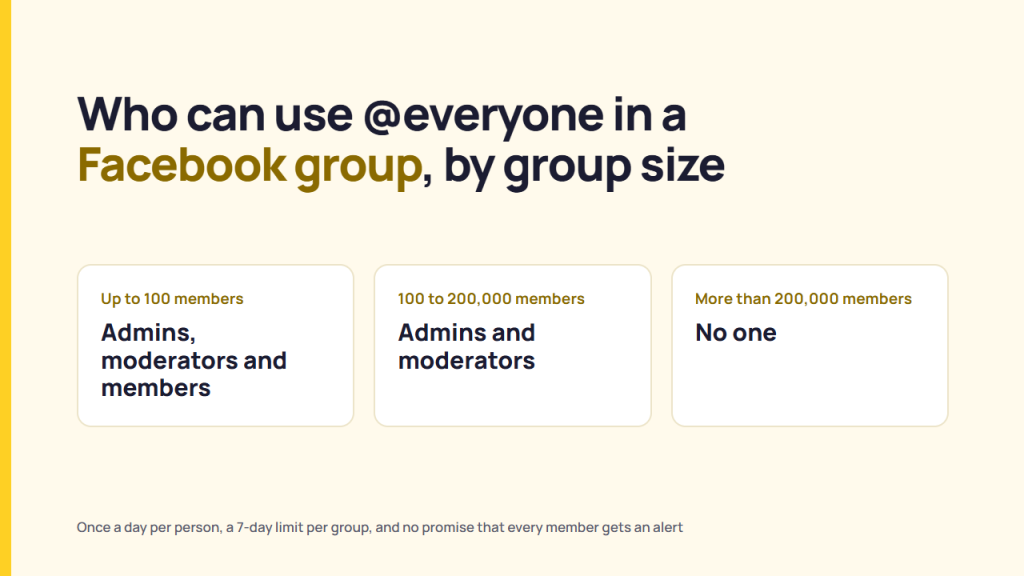
Facebook’s Help Centre ties the right to use @everyone to group size. Admins, moderators and members can use it for a group that has up to 100 members. For groups with 100 to 200,000 members, only admins and moderators can use the tag. If the group has above 200,000 members, no one can.
Each person who can use @everyone can use it once a day in a group. The group also has a 7-day limit, and every use counts toward it. The article does not publish the number. Also, a tag doesn’t promise an alert to every member.
Who can use @everyone, by group size
Facebook sets bands for its three group sizes, as read from the group article page. Check the table prepared from Facebook documents to understand who can use the @everyone tag.
The right to use the @everyone tag in groups depends on the size of the group. So, one person can have the right in one group and not in another.
| Group size | Who can use @everyone | What Facebook says and supports |
|---|---|---|
| Up to 100 members | Admins, Moderators, and Members | “all admins, moderators and members can use @everyone” |
| 100 to 200,000 members | Admins and Moderators | “admins and moderators can use it” |
| More than 200,000 members | No one | “no one can use it” |
Consider a client’s freelance community manager who moderates a client group of about 3,000 members is in the middle band. So, they have the right to use @everyone, but a regular group member cannot. Conversely, a regular member gains the right to use the tag once a day in a small group of 99 members.
Another page, “About batch mentions on Facebook”, lists “not an admin or moderator” as a reason why a person cannot use the @everyone tag. The About page does not mention the small-group case. The group article is the more specific page, so this piece follows it. That is a reading of the two pages, not a statement from Facebook.
There are 2 bands that list 100 members in the table. However, none of the article pages say which band is the right fit for a group of exactly 100 members.
How often @everyone can be used
Facebook documents two limits on how often the @everyone tag is used in a group. Firstly, each person who can use @everyone can use it once a day in a group. Secondly, each group also has a limit on uses in a 7-day period, and all uses count towards it, regardless of who used @everyone.
There is no information in the article about any weekly number. A client group that has 3 moderators shows an example of pooling: if each moderator uses @everyone on Monday, all three uses count towards that group’s 7-day limit. This is a reading from the article. The arithmetic cannot say how many uses the limit allows.
How to tag @everyone
Facebook’s article gives two steps for a post or comment:
- Type @everyone
- Select @everyone from the drop-down suggestions
Also, the same article names the three reasons the option can be missing for the @everyone tag:
- The person is a regular member (not an admin or moderator) in a group of 100 or more members
- The group has more than 200,000 members
- The group reached the use limit for the @everyone tag within the 7-day bracket
Facebook calls @everyone a batch mention. The About page lists four batch mentions: @followers, @attendees, @everyone, and @highlight.
Who gets an alert and who doesn’t
Facebook Help Centre does not confirm that alerts always follow a tag in the group. Facebook’s pages together list six reasons a tagged person may get none:
| Reason | Where Facebook says it |
|---|---|
| The member turned off @everyone alerts | Tagging @everyone article; About batch mentions |
| The member already received too many batch-mention alerts on a particular day | Tagging @everyone article; About batch mentions |
| Facebook’s notifications AI system decided not to send one | Tagging @everyone article; About batch mentions |
| The person is a participant in a public group (not a member) | Tagging @everyone article |
| The person blocked the group admin or moderator | Tagging @everyone article; About batch mentions |
| The person cannot see the original content or is outside the audience | About batch mentions |
The About page adds that only people who can already see the content can see a batch mention. None of the pages provide an exact number for ‘too many’ alerts. Also, the pages don’t explain how the notifications AI system restricts notifications by itself.
Consider a client’s event post that uses the @everyone tag, and 1 member reported no alert. The pages give six possible reasons, and none can be told apart from outside that member’s account. None of the pages mention what share of members receive the alert.
How a member turns @everyone off
Facebook’s “Turn off batch mentions on Facebook” page provides account-level steps on the computer:
- Click the profile picture
- Select Settings and privacy, then Settings
- Click Notifications, then Tags
- Under ‘Receive notifications for’, click next to Batch mentions to turn them off
The setting covers batch mentions as a group, not only @everyone. That is a reading of the two pages, not a statement from Facebook. The About page says a person can turn off batch mentions from a specific group. The analyzed pages do not provide information on the related steps.
A member of 3 client groups who wants alerts from 1 and not the other 2 needs group-level controls. The steps are nowhere mentioned on the read pages, and the mobile steps for the account settings were not read either.
Questions to ask before you use @everyone in a client’s group
Five questions help sort a group before the announcement goes out:
| Question | What Facebook documentation says to look for |
|---|---|
| 1. How many members does the group have? | Up to 100, 100-200,000, or above 200,000. The band sets who can use @everyone, and above 200,000, no one can |
| 2. Does the person hold an admin or moderator role? | In groups of 100 or more members, only admins and moderators can use @everyone |
| 3. Has this person already used @everyone today in this group? | Each person can use it once a day in a group |
| 4. Has the group reached its 7-day limit? | A group limit exists, and all uses count towards it. The number is not published |
| 5. Must every member see the announcement? | Members may not see alerts for 6 reasons (so the @everyone tag does not confirm notifications) |
Because members may not get a Facebook group alert, an announcement that needs to reach every group member cannot rely on the @everyone tag alone. That is a reading of the pages, not a statement from Facebook. In such instances, members turn alerts off, and Facebook’s AI can withhold them. Facebook’s pages do not mention this.
What could not be confirmed
This reading cannot settle eight points:
- The number of @everyone uses a group’s 7-day limit allows is not published on the pages read
- The band for a group of exactly 100 members is not stated
- The article line “This batch mention works on Facebook and Forum” is not a complete explanation and provides no insights about Forum
- The About page omits the small-group case that the group article documents
- The information or rule that Facebook uses to count group members is not stated
- The mobile steps for turning off batch mention, and the steps for a single group, were not read
- The 3 Help Centre pages used as references do not display revision dates
- How the notifications AI system decides, and what counts as too many alerts, is not stated
FAQ
Who can tag everyone in a Facebook group?
Facebook’s Help Centre says that admins, moderators, and members can use the @everyone tag in a Facebook group of up to 100 members. For groups with 100 to 200,000 members, only admins and moderators can use the tag. For groups with more than 200,000 members, no one can use it.
How many times can I use @everyone?
Facebook says each person who can use @everyone can use it once a day in a group. Every group has a 7-day limit on the number of @everyone tags. The page read does not publish that number.
Does @everyone notify every member?
Not always. Facebook Help Centre says that members can turn it off in settings themselves. Help Centre pages list 2 conditions under which Facebook can withhold alerts: too many batch mentions in a day, or when the notifications AI system decides not to send one.
Why can’t I see @everyone in my group?
Facebook Help Centre mentions 3 reasons why you can’t see the @everyone tag in a group. You are a member (not an admin or moderator) in a group of 100 or more members, the group has more than 200,000 members, or the group has reached its limit on uses.
Sources
Publisher, page title, URL, read on 2026-10-14.
- Meta, Facebook Help Centre, “How to tag @everyone in a post or comment in a Facebook group“, read 2026-10-14
- Meta, Facebook Help Centre, “About batch mentions on Facebook“, read 2026-10-14
- Meta, Facebook Help Centre, “Turn off batch mentions on Facebook“, read 2026-10-14