A social media content system is organized when anyone on the team can answer three questions in under a minute: which version of a post is final, who approved it, and when it goes out. Most teams can’t. The captions sit in one document, the graphics sit on a designer’s desktop, the dates sit in a spreadsheet and the approvals sit in an email thread. No single piece is missing. The trouble is that nothing connects them.
This guide is for agency teams and freelancers who run social accounts for clients, and for in-house teams handling several brands. It covers what to organize, why the system breaks as volume grows, a six-step way to rebuild it, and how to split the work between a document workspace and a publishing tool so each one holds what it is good at.
What a social media workflow needs to organize
A social media workflow holds eight kinds of material, and each has its own owner and its own shelf life. Listing them first tells you what the system has to hold before you choose where anything lives.
| Material | What it includes | How long it stays current |
|---|---|---|
| Ideas and research | Topic ideas, audience notes, references, content pillars | Months; review each quarter |
| Post copy | Captions, hashtags, CTAs, scripts, platform-specific versions | Until it is published or recycled |
| Creative assets | Images, videos, graphics, GIFs, design templates | Per campaign, except evergreen files |
| Campaign documentation | Briefs, objectives, audiences, key messages, timelines, deliverables | For the length of the campaign, then archived |
| Content calendar | Publish dates, platforms, formats, owners, status | Rolling; changes daily |
| Approvals and feedback | Review comments, revisions, sign-off records | Kept as an audit trail after publishing |
| Brand resources | Brand guidelines, messaging frameworks, logos, fonts | Years; one approved version at a time |
| Performance data | Post metrics, campaign reports, learnings | Feeds the next planning cycle |
The third column matters more than it looks. Brand guidelines change once a year. The calendar changes every day. When both sit in the same folder with the same rules, one of them ends up badly managed.
Why social media content and assets get hard to manage
Social media content gets disorganized gradually. Every new campaign, client or team member adds a workaround, and at low volume each workaround costs nothing. Once the team publishes dozens of posts a week across several accounts, they start to cost a lot. These five failures show up most often.
1. Each person stores work in their own place
The designer keeps graphics on a laptop, the copywriter drafts captions in a personal document, and the video sits in someone’s phone gallery. When storage depends on the person, nobody else can find the latest file or pick up where a colleague stopped.
2. File names don’t say what the file is
A file called “final_v2_USE THIS ONE.png” doesn’t say which campaign, platform or date it belongs to. Across a few hundred files, finding the right one turns into guesswork.
3. Campaign details are split across tools
Assets are in the design tool, captions are in docs, timelines are in a spreadsheet and approvals come by email or chat. Every check means opening four places, and a feedback comment left in the wrong one gets missed.
4. Knowledge leaves when a person leaves
When the person who managed the files leaves or changes roles, the logic behind the folders goes with them. If ownership and process were never written down, the next person rebuilds them from scratch.
5. There is no single source of truth
Ask three team members where the current brand guidelines are and you may get three different answers. Without one trusted location, people use whatever version they saved last. That is how a retired logo ends up in a live post.
How to build a social media content organization system
A working system makes content easy to find, review, schedule and reuse, and it stays simple enough that the team keeps following it. These six steps build one.
Step 1: List everything the team handles
Write down every type of material from the table above that your team actually touches, and name who creates each one. A freelancer running three accounts may only need four of the eight categories. An agency running twenty clients needs all eight, plus a separate set for each client.
Step 2: Sort content by purpose
Group posts by the job they do, such as educational, promotional, behind-the-scenes, user-generated or evergreen. Purpose-based groups let you pull the right kind of post when a gap opens in the calendar. They also show when one type is crowding out the others.
Step 3: Set one file naming rule and apply it everywhere
Use one naming pattern for every file: client or brand, platform, campaign, asset type and date. “acme_ig_launch-teaser_reel_2026-12” can be found by search and understood at a glance. “final2_USE.png” can’t. Put the rule in writing where the whole team can see it, and rename old files the next time someone touches them.
Step 4: Link each post to its campaign and assets
Every post should point back to the brief it serves and the approved assets it uses. With that link in place, a reviewer can check a caption against the brief without asking for context, and anyone reusing an asset can see where it has already run.
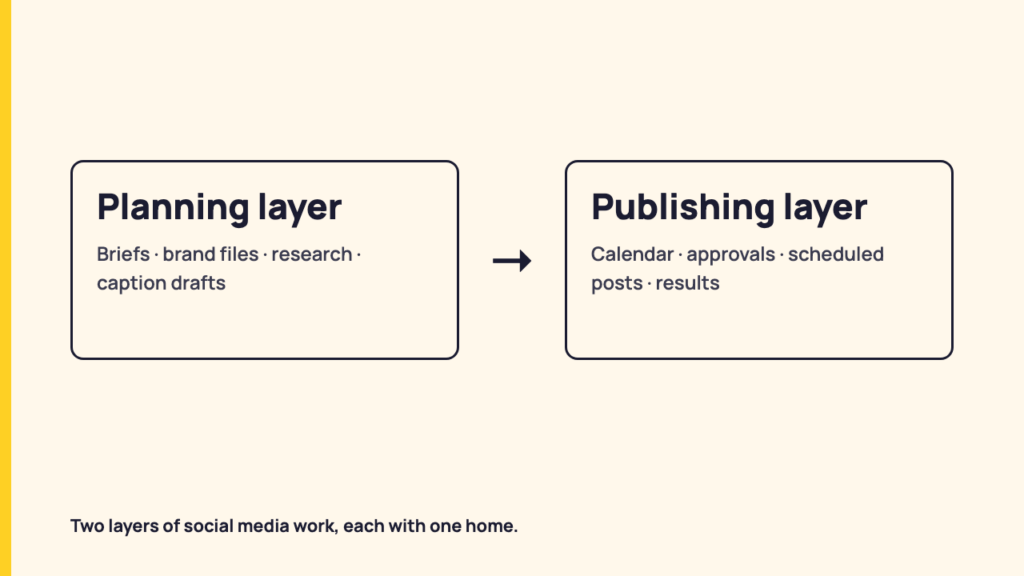
Step 5: Split the work into a planning layer and a publishing layer
This is the step most teams skip. Social media work lives in two layers, and they need different tools:
- The planning layer holds material people read, discuss and edit together: briefs, brand guidelines, research, caption drafts and meeting notes. It needs rich documents, embedded files, comments and version control.
- The publishing layer holds material that goes out on a schedule: the final post, its platform settings, its date, its approval status and its results. It needs a calendar, an approval step, account permissions and a connection to each social network.
Teams get into trouble when they force one layer into the other’s tool. A spreadsheet works poorly as a publishing calendar, and a scheduler works poorly as a brand wiki.
Step 6: Give each layer one home
Choose one tool for each layer, move everything into it, and retire the old locations. The next section covers what to look for in each.
Choosing a home for the planning layer
The planning layer needs a document workspace that holds text, files and embeds in one shared page. A spreadsheet or a plain doc folder can work for a small team. As the number of campaigns grows, a dedicated document tool is easier to maintain.
One example of this kind of tool is bit.ai, a document and knowledge-management workspace. For a social team, these features matter most:
- One doc per campaign. The brief, draft captions, reference links and asset previews sit on one page instead of five tabs.
- Embedded media. Bit.ai docs can embed images, videos, PDFs and content from its 100+ integrations, such as a Figma design or a YouTube video, so reviewers see the creative next to the copy.
- AI Writer. Its AI Writer drafts, rewrites, summarizes and translates text inside the document, which helps when one caption needs several platform versions.
- Templates. A template library gives you a starting structure for campaign briefs and marketing plans.
- Guest access and client portals. Agencies can share a workspace with a client without handing over the whole account.
A document workspace fits when briefs, brand rules and caption drafts need several rounds of discussion, or when clients want to read and comment on strategy before anything is scheduled.
It doesn’t fit as the place posts go live. A document tool doesn’t publish to Instagram or LinkedIn, doesn’t enforce platform limits, and doesn’t record whether a post actually went out.
Choosing a home for the publishing layer
The publishing layer needs a social media management tool, where final content becomes scheduled posts. When comparing options, check four things, because each one replaces a workaround described earlier.
- A calendar the client can see. In RecurPost, the shared content calendar lets a client view scheduled posts and leave comments without logging in, so feedback stays on the post instead of going to email.
- An approval step before publishing. RecurPost’s approval workflow holds a post until a reviewer approves it, and clients can approve without an account. The approval record stays attached to the post.
- Access split by client. Workspaces keep each client’s accounts and posts separate, and roles and permissions set what each team member can do inside each workspace.
- Categories for reusable posts. Content libraries group posts by purpose, which is Step 2 carried into the tool, and can reshare evergreen posts on a schedule.
A publishing tool fits when the team schedules across several accounts or clients and needs a record of who approved what and when it went live.
It doesn’t fit as a replacement for long-form planning. Brand guidelines, research and multi-page briefs belong in the planning layer, with a link from the post to the brief.
The two layers work together through links. The campaign doc links to the calendar view, and each scheduled post links back to its brief. If you are still choosing a scheduler, RecurPost’s overview explains how the publishing side is set up.
Best practices that keep the system from slipping
An organized system decays unless someone maintains it on a schedule. These habits cover the usual failure points.
| Practice | How often | What it prevents |
|---|---|---|
| Review the content library | Every quarter | Outdated assets, expired promotions and duplicate files piling up |
| Repurpose posts that performed | Every planning cycle | Creating from scratch when a proven post can be adapted |
| Enforce the naming and folder rules | Every upload | The “one quick exception” that brings the mess back |
| Document the workflow | Whenever a step changes | Slow onboarding and teammates following different processes |
| Assign one owner per layer | Once, then on every role change | Uploads, naming and archiving being everyone’s job and nobody’s |
| Recheck the system as the team grows | At each change in team size or client count | A setup that suited 3 people breaking down at 15 |
Conclusion: one home for each layer
Disorganized social media work costs time, causes missed deadlines and produces inconsistent branding that the audience notices. The fix isn’t one tool that does everything. Decide what the team handles, name files one way, link every post to its brief and assets, and give the planning layer and the publishing layer one home each.
Once that is in place, the team spends less time searching, new hires learn the process from the documentation, and nobody has to ask which file is the real final version.