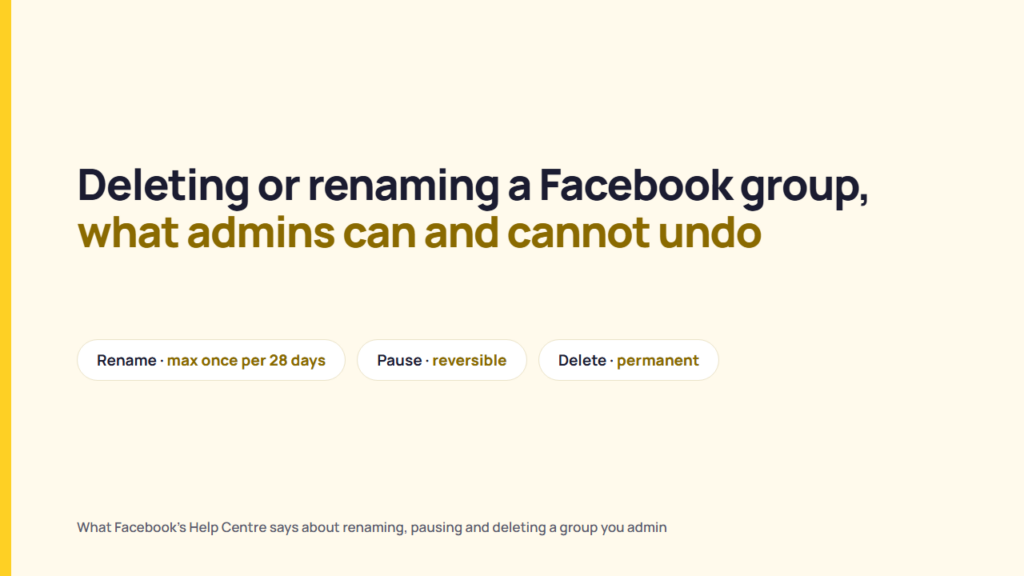
A Facebook group can only be deleted when it has no members, and Facebook says deletion “is permanent and can’t be reversed”. Only group admins can rename a group, not more than once every 28 days, and every member is notified of the new name. Facebook offers pausing as the reversible alternative, and says archiving a group is no longer available.
A freelance manager holds the admin role in a client’s customer community group on Facebook. The client has two requests: rename the group after a rebrand, and later close it when the programme ends. Facebook treats those two requests very differently. The scenario is hypothetical.
This piece is a reading of ten Facebook Help Centre pages, read on 2026-11-03. The rename, delete and pause pages were read in the computer, iPhone app and Android app views. No live group was renamed, paused or deleted for testing, and no third-party tutorials were used.
Who can rename, pause or delete a Facebook group
Facebook’s Help Centre says, “There are two roles for people who manage groups: admins and moderators.” Facebook’s role table gives group settings, such as the group name, to admins only.
| Action | Admin | Moderator | What Facebook’s page says |
|---|---|---|---|
| Change the group name | Yes | No | “Only group admins can change the group name.” The role table ticks group settings, “e.g. change the group name”, for admins only. |
| Pause the group | Yes, any admin | Not listed | Facebook’s pause-versus-delete table answers “Yes” to whether any group admin can pause. |
| Delete the group | The creator, or any admin once the creator is no longer a member | Not listed | “Only the group’s creator (who is also an admin) can delete the group.” |
| Add or remove admins and moderators | Yes | No | “Only admins can invite someone to become an admin or moderator.” |
| Remove and ban people | Yes | Yes | The role table ticks this for both roles. |
Sources: Facebook Help Centre, “Difference between an admin and moderator of a Facebook group”, “Change the name of a Facebook group that you admin”, “Difference between pausing and deleting a Facebook group that you admin”, “Add an admin or moderator to your Facebook group”. Read 2026-11-03.
The group creator gets one extra protection. Facebook’s page on removing admins says group creators “can’t be removed by another admin”, although a creator can remove themselves as an admin or leave the group.
A freelance manager who holds the admin role in a group the client’s owner created can rename and pause the group, but cannot delete it while the owner is still a member. That is a reading of the two pages, not a statement from Facebook. The role table answers the question of who on the client’s side needs to act. Facebook’s pages read do not explain how an admin invitation is accepted on each device. Who can use @everyone in a group is covered in who can use @everyone in a Facebook group.
How to delete a Facebook group
Facebook’s delete article says “You can only delete a Facebook group when it has no members”, and that deleting a group “is permanent and can’t be reversed”. The same note suggests “consider pausing the group instead”.
Facebook’s delete article sets two routes, both open only when the group creator has left the group or the admin is the creator:
- A private group is emptied by removing all members, then the admin leaves.
- A public group is emptied by banning all members, then the admin leaves.
Delete a Facebook group on a computer
- Go to facebook.com/groups and select your group.
- Click Members (private groups) or People (public groups) at the top of the group. You might need to select More first.
- Click Options next to each member’s name and select Remove member (private groups) or Ban from group (public groups).
- Click Next, then click Confirm.
- When you’re the last group member, click Options next to your own name and select Leave group. Click Delete group to confirm.
Delete a Facebook group on the iPhone or Android app
- Tap Menu in the top left of Facebook, tap Groups, then Your groups, and select your group. If you can’t see Groups, tap See more.
- Tap Admin tools and select People.
- Tap each member’s name and select the remove option (private groups) or the ban option (public groups). The iPhone app labels these Remove [name] from group and Ban [name]; the Android app labels them Remove member and Ban from group.
- Tap Next, then tap Confirm.
- When you’re the last group member, tap Admin tools, then tap Delete group. On iPhone, Facebook says to return to the main group page first and scroll down to find it.
- Tap Delete group to confirm.
Facebook’s steps describe removing members one at a time, and the page describes no bulk option. That is a reading of the steps, not a statement that none exists.
Facebook’s delete article also includes one line that does not sit easily with those steps: “When no members remain in the group, it will automatically be paused.” The page does not explain how that line relates to the Delete group confirmation, and this piece does not guess.
Facebook’s delete article says “Group members aren’t notified when you delete a group.” Facebook’s pause-versus-delete table adds that, once a group is deleted, members and admins can no longer access their information. Facebook’s pages read give no download step and no retention period for a deleted group’s content.
Consider a client’s 2,400-member public group that closes after a product is retired. Deletion means banning 2,400 people one by one before the last admin leaves, and none of them is told the group was deleted. That is a reading of the article, not a statement from Facebook, and the count is illustrative. Deletion fits a group the client is sure it will never use again. It does not fit a group the client may reopen, or whose members may still want their information.
How to change a Facebook group’s name, and the 28-day limit
Facebook’s rename article says every member is notified of a name change, and that a group’s name cannot change more than once every 28 days. The article puts it in two sentences: after a change, “all members will receive a notification”, and “You can’t change the group’s name more than once every 28 days.”
Rename a Facebook group on a computer
- Go to facebook.com/groups and select your group.
- Click Group settings in the left menu.
- Click Edit next to Name and description.
- Enter the new name and click Save.
Rename a Facebook group on the iPhone or Android app
- Tap Menu in the top left of Facebook, tap Groups, then Your groups, and select your group. If you can’t see Groups, tap See more.
- Tap Manage group, then tap Group settings.
- Tap Name and description.
- Change the group name and tap Save in the top right.
A client that rebrands on a Monday can have its group renamed the same day. A typo in the new name then waits 28 days for a second change, and every member has already been notified of the first one. That is a reading of the article, not a statement from Facebook. The 28-day rule suits a final, approved name, and does not suit trying names out.
Facebook’s rename article says nothing about a member-count limit, about the group’s web address after a rename, or about renaming a paused group. Facebook’s pause-versus-delete table says admins of a paused group cannot edit group details such as the description or photo, other than the cover photo, but the table does not say whether the name counts as a group detail.
Pause vs delete a Facebook group: nine differences
Facebook’s pause article describes pausing for an admin who needs “a break from maintaining it”, and Facebook’s comparison page says “Archiving a group is no longer available.”
Facebook says a paused group shows a message at the top explaining that all activity has been paused, and that “New posts, comments and reactions are paused for everyone, including admins.” An admin pausing a group picks a reason, can write an announcement about the pause, and can schedule a date for the group to resume on its own. Facebook says members of a paused group can still delete their posts or comments, access their information and leave, and that Facebook “can continue to enforce Community Standards” during a pause.
How to pause a Facebook group
- On a computer: go to facebook.com/groups, select your group, click Options below the cover photo and select Pause group. Select a reason, click Continue, then click Continue again to confirm. Add an announcement or a resume date if you want one, then click Pause group.
- On the iPhone or Android app: open the group from Menu, Groups, Your groups, tap Admin tools in the top right and select Pause group. Select a reason, tap Continue twice, add an announcement or resume date if you want one, then tap Pause group.
How to resume (unpause) a Facebook group
- On a computer: go to facebook.com/groups, select your group, click Resume below the cover photo, then click Confirm. To move a scheduled resume date, click Edit below the cover photo, adjust the date and time and click Confirm.
- On the iPhone or Android app: open the group, tap Manage at the top right, then tap Resume activity in group. On iPhone, Facebook says a scheduled resume date is changed from Manage, then Edit resume date and time.
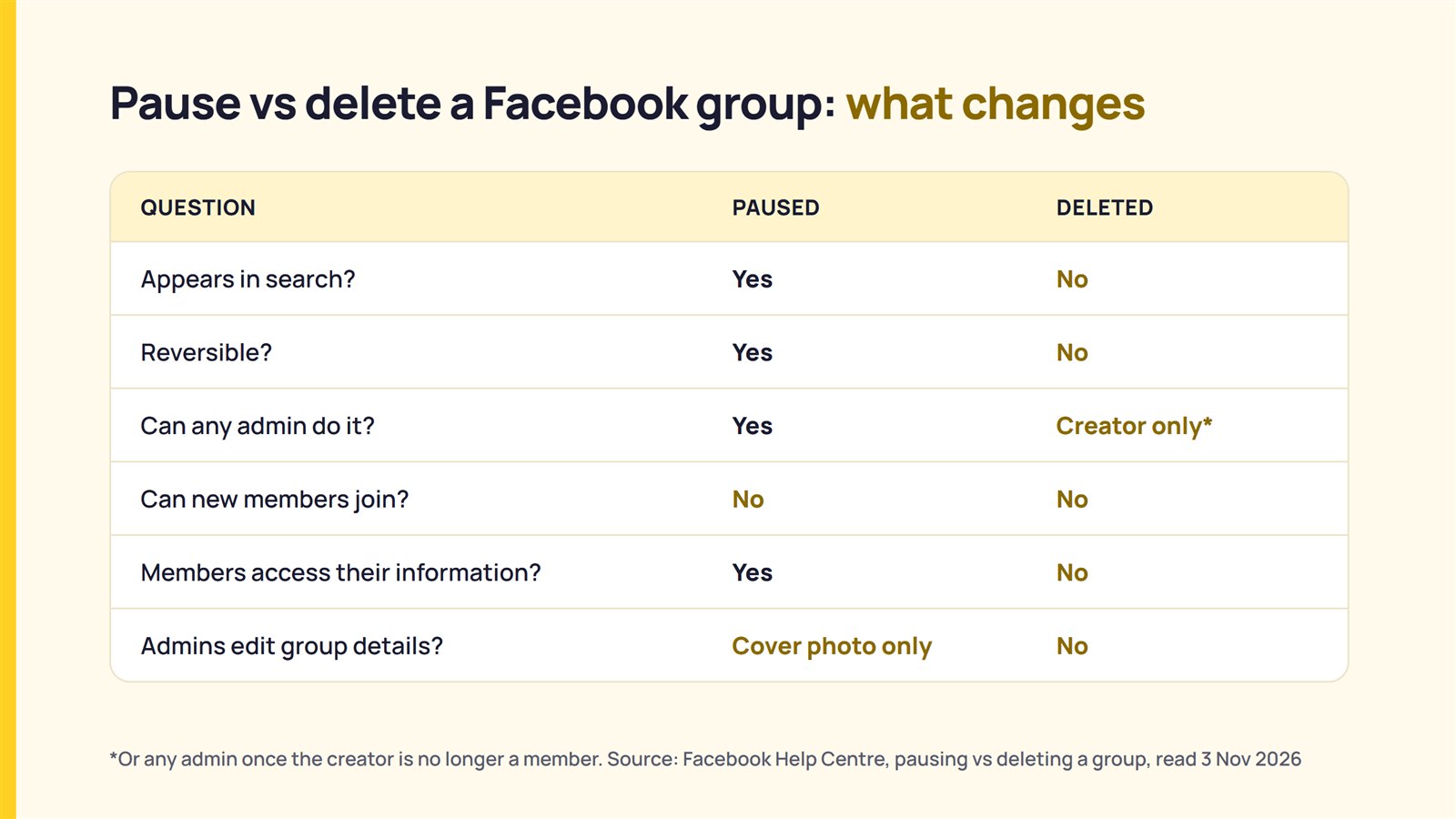
Facebook’s comparison page sets out nine differences between a paused group and a deleted one:
| Question in Facebook’s table | Paused | Deleted |
|---|---|---|
| Appears in search? | Yes | No |
| Reversible? | Yes | No |
| Can any admin do it? | Yes | No: the creator, or any admin once the creator is no longer a member |
| Can new members join? | No, but admins can approve requests made before the pause | No |
| Posting, commenting, adding photos and videos? | No, but admins can manage posts written before the pause | No |
| Admins remove posts, comments, photos and videos? | Yes | No |
| Admins remove and ban people? | Yes | No |
| Admins edit group details, such as the description or photo? | No, except the cover photo | No |
| Members and admins access their information? | Yes | No |
Source: Facebook Help Centre, “Difference between pausing and deleting a Facebook group that you admin”. Read 2026-11-03.
A client’s seasonal customer group that goes quiet between campaigns is the case pausing fits: the group stays in search, members keep access to their information, and the admin can set a resume date. That is a reading of the two pages, not a statement from Facebook. A paused group still appears in Facebook search, so pausing does not fit a client that wants the group out of sight.
What happens when a Facebook group’s last admin leaves
Facebook says that if the only admin of a group leaves, deactivates or deletes their account, they are prompted to invite a new admin, and the group “will be automatically paused” if no new admin is selected or no one accepts within seven days.
Facebook repeats that rule on four of the pages read, and adds two cases on its page about groups without admins. If the only admin’s account is memorialised, “the group will be paused within seven days.” Facebook also says, “This also applies when a Page is a group admin.”
Facebook’s page on adding admins sets two conditions on the successor: group members “must be active in the group in order to be made an admin”, and “In some cases, grey accounts can’t become admins of groups.” Facebook’s page on Page admins says a Page becomes a group admin by joining the group and being invited by a current admin, and that “only Page admins with Facebook access of a Page can act as the Page in a group”.
Consider an agency whose contract with a client ends while its account lead is the group’s only admin. Unless the client’s owner, or the client’s Page, accepts an admin invitation within seven days, the group is paused. That is a reading of the pages, not a statement from Facebook. Facebook’s pages read do not say whether a paused group left without an admin can be claimed later, or by whom. The same handover question on LinkedIn and YouTube is covered in what LinkedIn and YouTube publish about control when a manager leaves.
Checking a client’s group before you rename or delete it
Six questions sort a client’s request before anyone clicks Save or Delete group.
| Question | What the documentation says to look for |
|---|---|
| 1. Are you an admin or a moderator, and is the client the group’s creator? | Facebook gives the group name to admins only, and deletion to the creator unless the creator is no longer a member. |
| 2. Is the new name final? | Facebook allows a name change not more than once every 28 days, and notifies all members. |
| 3. Does the client want the group gone, or only quiet? | Facebook says a paused group can be resumed, and a deleted group cannot be restored. |
| 4. Is the group private or public? | Facebook says private group members are removed, and public group members are banned, before deletion. |
| 5. Do members need their information? | Facebook says members and admins cannot access their information in a deleted group. |
| 6. Who will be an admin after you leave? | Facebook pauses a group whose only admin leaves if no one accepts an admin invitation within seven days. |
Facebook documents one action with a wait, a rename every 28 days at most, one that can be reversed, a pause, and one that cannot, a deletion. The client decides whether to rename, pause or delete its group.
What could not be confirmed
This reading of Facebook’s pages cannot settle ten points:
- Facebook’s delete article does not explain how its “automatically be paused” line fits with its Delete group step.
- Facebook’s rename article states no member-count limit on renaming, and this piece cannot confirm whether one exists.
- Facebook’s pages read do not say whether a rename changes the group’s web address, and no Help Centre page on a group’s web address was found.
- Facebook’s pages read do not say whether a paused group can be renamed.
- Facebook’s pages read give no way to download a group’s content before deletion and no retention period afterwards.
- Facebook’s delete steps describe removing members one at a time; whether a bulk option exists was not confirmed.
- Facebook’s pages read do not say whether a paused group with no admin can be claimed later.
- The app steps for deleting end at Admin tools and Delete group, while the computer steps end at Leave group; the pages do not say whether the two routes differ in effect.
- The iPad, mobile browser and Facebook Lite views were not read, and the role, admin and Page pages were read in the computer view only.
- Facebook’s Help Centre pages show no revision dates, so the read date is the only dating, and no group was renamed, paused or deleted to test the pages.
FAQ
How often can I change a Facebook group’s name?
Facebook says not more than once every 28 days. Only group admins can change the name, and Facebook says all members receive a notification when it changes.
Can I change a Facebook group’s name before 28 days?
Facebook’s rename article says “You can’t change the group’s name more than once every 28 days.” The pages read describe no exception, including for a typo.
Can a moderator delete or rename a Facebook group?
No. Facebook’s role table gives group settings, including the name, to admins only. Facebook limits deletion to the group’s creator, or to any admin once the creator is no longer a member.
Can an admin who did not create the group delete it?
Only once the creator is no longer a member. Facebook’s comparison page says that “If the creator admin is no longer a group member, any admin of the group can delete it.”
Can I delete a Facebook group without removing the members?
Facebook says a group can only be deleted when it has no members, so members of a private group are removed and members of a public group are banned first. Pausing does not require removing anyone.
If I delete a Facebook group, will the members know?
Facebook says “Group members aren’t notified when you delete a group.” Once it is deleted, members can no longer access their information in it.
Can a deleted Facebook group be recovered?
Facebook says deleting a group is permanent and can’t be reversed. Facebook offers pausing as the option that can be undone.
How do I unpause a Facebook group?
On a computer, click Resume below the group’s cover photo, then click Confirm. In the iPhone or Android app, tap Manage at the top right of the group, then tap Resume activity in group.
Can I still archive a Facebook group?
No. Facebook’s Help Centre says “Archiving a group is no longer available.” A paused group stops new posts, comments and reactions and can be resumed, and the choice between pausing and deleting is the client’s.
Sources
Publisher, page title, URL, read on 2026-11-03 (English (UK) locale).
- Meta, Facebook Help Centre, “Change the name of a Facebook group that you admin“, read 2026-11-03
- Meta, Facebook Help Centre, “Delete a Facebook group that you admin“, read 2026-11-03
- Meta, Facebook Help Centre, “Difference between pausing and deleting a Facebook group that you admin“, read 2026-11-03
- Meta, Facebook Help Centre, “Pause a Facebook group that you admin“, read 2026-11-03
- Meta, Facebook Help Centre, “Leave a Facebook group“, read 2026-11-03
- Meta, Facebook Help Centre, “Difference between an admin and moderator of a Facebook group“, read 2026-11-03
- Meta, Facebook Help Centre, “Add an admin or moderator to your Facebook group“, read 2026-11-03
- Meta, Facebook Help Centre, “Remove an admin or moderator from your Facebook group“, read 2026-11-03
- Meta, Facebook Help Centre, “Make a Page an admin of a Facebook group you manage“, read 2026-11-03
- Meta, Facebook Help Centre, “What happens when a Facebook group doesn’t have any admins“, read 2026-11-03