The client review meeting went well. The client liked the report and said the numbers looked fine. They promised to check next month’s posts. Two weeks later, those posts still aren’t approved, and nobody has booked the next call.
If that sounds familiar, the problem probably wasn’t finding a time. It was everything around the meeting. The client came in without knowing what they had to decide. The person who approves posts wasn’t on the call. And once the call ended, nobody booked the next one.
Many social media managers already use a booking link, and it does help. Clients pick a time on their own, so you don’t trade five emails to agree on one slot. But a link only books the call. It doesn’t ask the client what they want to decide, remind them the day before, or set up next month’s review. Those parts need their own setup, and that’s what this guide walks through.
The gap isn’t rare. In Microsoft’s 2023 Work Trend Index, 55% of 31,000 workers said next steps at the end of a meeting are unclear (read 8 November 2026). That’s workers in general, but anyone who has chased a client for approval will recognize it.
This guide is for agency teams, freelancers, and anyone who runs social accounts for several clients or locations. It covers why review meetings are hard to set up, how to schedule them step by step, and what to send before and after the call.
Why client review meetings are hard to schedule
A review looks simple. One client, one call, once a month. But each one depends on a few people, more than one calendar, and a report that has to be ready on time. Small problems pile up.
1. Agreeing on a time takes a long email thread
You send three time options. The client replies a day later, and one slot is already gone. So you send new options, and the thread starts again. With five or six clients, this happens every week.
2. Your calendar shows free time that isn’t really free
Many social media managers work from more than one calendar: their own, a team calendar, sometimes one per client. A time looks open in one but is taken in another. You find out after the client has booked it, and now you have to ask them to move.
3. Clients join the call without knowing what to decide
The client knows there’s a call, but not what it’s for. So they come ready to listen. The first ten minutes go to reading the report aloud, the posts that need approval get rushed at the end, and the client leaves without deciding.
4. The person who approves posts isn’t on the call
Your contact likes the plan, then says, “Let me check with my manager.” The real approver was never invited. The call ends with nothing approved, and the posts wait another week.
5. Clients forget the call or cancel at the last minute
When a client gets busy, your meeting is often the first thing to go. No reminder went out, or the time looked different in their time zone. A missed review pushes approvals back, and the publishing plan slips with it.
6. You have to book the same review again every month
The review happens every month, but it was never booked as a series. So each month, someone sends a new invite and the scheduling starts over. That someone is usually you.
None of these is big on its own. Together, they’re why a monthly review can take longer to set up than to run. The steps below fix them in the same order.
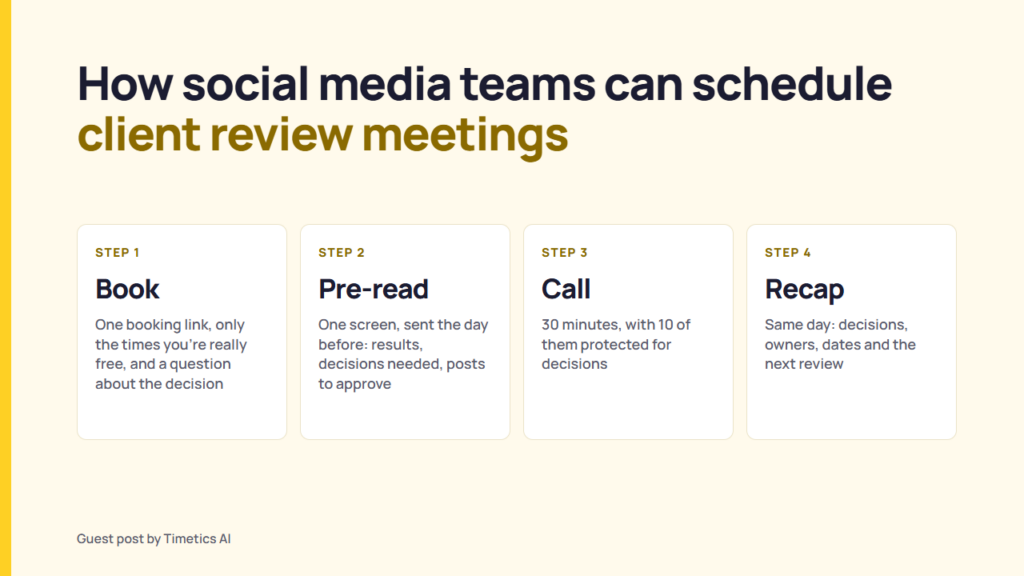
How to schedule client review meetings, step by step
Most of these problems start before the call, so that’s where the fixes go. Step 1 sets up the meetings you need. Steps 2 to 7 fix the six problems, in order.
You can do some of this by hand, with a shared calendar and a few reminder emails. That works for one or two clients. With five or ten, the manual version breaks. Someone forgets a reminder, a calendar isn’t checked, or a monthly review never gets rebooked.
A booking tool can handle those three jobs. In Timetics AI, for example, the booking page hides times that are busy in your connected Google or Outlook calendar, a workflow sends the reminder email, and the client can book the monthly review as a repeating series.
Step 1: Decide which meetings you need
Not every question needs a call. Pick a few meetings, and give each one a single job. Everything else can go to email or post comments.
| Meeting | What it’s for | Length | How often |
|---|---|---|---|
| Kickoff | Agree on goals, channels, owners, and who approves posts | 45 minutes | Once, at the start |
| Monthly review | Decide what to keep, stop, and try next month | 30 minutes | Monthly |
| Approval call | Clear posts that are stuck | 15 minutes | Only when approvals run late |
| Quarterly review | Check goals, channel mix, and budget | 60 minutes | Every three months |
These are starting points, not rules. Doodle’s client meeting templates use the same lengths for a kickoff and a quarterly review (read 8 November 2026).
The setup is worth doing once. Picture a freelancer with four retainer clients (a made-up example). Twelve 30-minute monthly reviews and four 60-minute quarterly calls per client come to 64 meetings a year. That’s 40 hours of calls before any prep.
Step 2: Share one booking link instead of trading emails
Stop sending three time options. Send one link. The client picks a time, and the call is booked.
Make one booking option for each row in the table. Give it a plain name and a fixed length. “Monthly review, 30 minutes” tells the client what they’re booking. “Quick chat” doesn’t.
Step 3: Show only the times you’re really free
A booking link is only as good as the calendar behind it. If one calendar isn’t connected, double bookings come back.
Connect every calendar you work from, including the one with other clients’ calls. Check again each time you add a new one.
Then leave a gap between calls: a few minutes before a review to open the report, and a few after to write the recap. Set it as a buffer in your booking tool, so the gap is built in instead of remembered. In a small 2021 Microsoft study (read 8 November 2026), 14 people wore EEG caps through four half-hour meetings. Back to back, stress-linked brain activity kept rising. With 10-minute breaks, it stayed steady. The breaks were spent meditating, not writing notes, so treat it as a reason to keep the gap, not proof of how long it should be.
Step 4: Ask what the client wants to decide
Most booking forms ask for a name and an email. That’s enough to book a call, but not to prepare for one. Add three or four short questions:
- Which campaign or topic should we cover?
- What decision do you want to leave with?
- Who else needs to approve it, and can they join?
- Has anything changed since our last review, like a launch, a new offer, or a new team member?
Make the second question required. Now the call has a decision to reach. If the answer is “nothing,” you may not need the call at all. Send the update by email instead.
Step 5: Get the decision-maker on the invite
Teams often skip this one. Question three already tells you who signs off.
If the approver can join, add them to the invite. If they can’t, ask for their decision in writing before the call, or agree on who can speak for them. Settle this at the kickoff so it isn’t a surprise later. Doodle’s kickoff template sets aside 10 minutes for “Decision makers, approvals, risks”.
Step 6: Send reminders and let clients reschedule themselves
Clients rarely skip a call on purpose. They forget, or something urgent lands. Make showing up easy, and make moving the call easier than cancelling it.
- Send a reminder before every call. Put the video link in it, so nobody hunts through old emails.
- Show times in the client’s time zone. And recheck recurring calls around clock changes. In 2026, the US moved its clocks on 8 March and the EU on 29 March, so a regular transatlantic slot shifted by an hour for three weeks.
- Let clients move the call themselves, up to a notice period you set. A day’s notice is a sensible start.
Step 7: Make the monthly review repeat
Pick one slot, like the second Tuesday at 10:00, and book it as a series. Nobody has to arrange next month’s review, and the client starts planning around it. If your booking tool supports recurring bookings, let the client choose the repeat when they book.
What to send before the call
The booking form tells you what the client wants to decide. The pre-read gives the client what they need before they decide: the numbers and the posts. Send it the day before, so the call can start with decisions instead of a report read aloud.
What to put in it
Keep it to one screen. Link to the full report instead of pasting it in. Start with the client’s answer to the decision question from Step 4.
Copy this:
Subject: [Client] review, [date]: [number] decisions needed
Goal: [the goal for this period]
Result: [this month, last month, and your usual level]
What worked: [one thing, and the likely reason]
What didn’t: [one thing, and the likely reason]
Decisions needed: [each question, with your recommendation]
To approve: [link to posts], by [date]
Make the numbers easy to trust
A client can’t decide if they doubt the numbers. Two quick checks help:
- Use the same formula every month. Engagement rate can be measured in several ways, and each way can put a different account on top. Pick one and say which one it is.
- Point out a one-off post. If one post went viral, it can make the whole month look better than it was. Say so in the pre-read.
Share the posts that need approval
Add a link to the posts the client needs to approve. This is easy when all drafts sit in one place. If they’re spread across chats, drives, and email, organize posts, files, and approvals in one system first. If you schedule in RecurPost, a shareable calendar link lets clients comment on planned posts without an account.
Now the client comes to the call having seen everything. The call can start with the decisions.
How to run the review call so it ends with a decision
The client has read the pre-read, so you don’t need to read the numbers aloud. Take a few minutes for their questions, then spend most of the call on decisions. Thirty minutes is enough if you split it like this:
| Time | What happens | What you leave with |
|---|---|---|
| 0 to 3 minutes | Confirm the decisions needed | An agreed list |
| 3 to 10 minutes | Answer questions about the results | Agreement on how the month went |
| 10 to 20 minutes | Work through each decision, starting with your recommendation | A yes, a no, or a named owner |
| 20 to 26 minutes | Next month’s plan and the approvals due | An approval deadline |
| 26 to 30 minutes | Read back owners and dates | The next review confirmed |
Protect the 10 minutes for decisions. If questions about the results run long, move on and keep the decisions.
What to send after the call
Send a recap the same day, or within 24 hours at most, while everyone still remembers what was said. Keep it short:
Decisions made: [number]
Decided: [each decision, in one line]
Owners and dates: [who does what, by when]
Approvals: [link to posts], by [date]. Posts without approval won’t be scheduled.
Next review: [date and time]
The approval line matters most. Silence isn’t approval, and the client should know what happens to a post nobody signs off.
FAQ
Should you record client review calls?
Only with consent, and tell everyone before you start. Recording rules vary by location. A written recap is usually the more useful record anyway.
Are extra calls included in a retainer?
Write the number of reviews into the contract. Then an added call is a clear choice for both sides, not a quiet extra.
What if a client changes an approved post after the review?
Treat it as a new approval. Note the change and the date, then confirm whether the publishing date still holds.
What if a client keeps missing review calls?
After two missed reviews in a row, pause the series. Send the pre-read by email with the decisions you need and a date to reply by. Then ask whether the time or the cadence still works for them. Often the slot no longer fits their week.
When can a client review be an email instead of a call?
When the numbers are on track and the client has no decision to make. Send the pre-read, ask for written approval of the posts by a set date, and save the call for months that need one. Keep the quarterly review as a call either way.
Who from your team should join a client review call?
The person who owns the account, plus anyone who has to present or act on a decision. One person leads, so decisions don’t get lost between voices. A designer or ads specialist can join for their part and then drop off.
Count decisions, not meetings
A full review calendar can look like good client service while the work stands still. One number shows which you have: write the count of decisions at the top of each recap. After three months, read down the list. If two reviews in a row produced none, change one thing: who you invite, what the pre-read asks, or how often you meet. The client doesn’t need more meetings. They need fewer reasons to say, “Let me get back to you.”
Sources
- Microsoft WorkLab, Will AI Fix Work? (2023 Work Trend Index), read 8 November 2026
- Microsoft WorkLab, Research Proves Your Brain Needs Breaks, 20 April 2021, read 8 November 2026
- Doodle, 5 meeting templates for client calls and creative reviews, read 8 November 2026
- WebExhibits, Daylight saving time around the world, read 8 November 2026
- RecurPost, Collaborate features, checked 8 November 2026
- Timetics docs, Appointment Booking Calendar & Scheduling, checked 8 November 2026